
VIM1 Development Guide
https://docs.khadas.com/products/sbc/vim1/development/start
VIM1 Build Ubuntu
- Host Machine
Ubuntu 20.04
sudo apt update sudo apt install git make lsb-release qemu-user-static - Get Fenix Source Code
$ mkdir ~/project
$ cd ~/project/
$ git clone https://github.com/khadas/fenix
$ cd fenix
$ git checkout v1.1.1
$ touch .ignore-update
$ mkdir -p build
$ cd build/
$ git clone https://github.com/khadas/u-boot.git -b khadas-vims-v2015.01
$ cd u-boot
$ git reset --hard 6f9237647ced3d7c48400b2e016055d6b28ebf8b
$ cd ..
$ git clone https://github.com/khadas/linux.git -b khadas-vims-4.9.y
$ cd linux
$ git reset --hard 65490b339af6dcb4ef1aa052621b79de63627cc8
$ cd ../../
- Setup Env
cd ~/project/fenix
source env/setenv.sh
fenix$ source setenv.sh
[i] FULL USAGE INFO: source setenv.sh --help
[i] press Ctrl+C for abort

Choose Khadas board:
 1) Edge     - Khadas Edge with Rockchip RK3399 SoC
 2) VIM1     - Khadas VIM1 with Amlogic S905X SoC
 3) VIM2     - Khadas VIM2 with Amlogic S912 SoC
 4) VIM3     - Khadas VIM3 with Amlogic A311D SoC
 5) VIM3L    - Khadas VIM3L with Amlogic S905D3 SoC
 6) VIM4     - Khadas VIM4 with Amlogic A311D2 SoC
 7) Generic  - Generic image (VIM1 VIM2 VIM3 VIM3L Edge) EXPERIMENTAL

Which board would you like? [2]
=> VIM1

Choose uboot version:
1. uboot-2015.01 - U-boot 2015.01
2. uboot-mainline - U-boot Mainline

Which uboot version would you like? [1] 2
=> mainline

Choose linux version:
1. linux-mainline

only one choose => mainline

Choose distribution:
1. Ubuntu - Ubuntu
2. Debian - Debian

Which distribution would you like? [1]
=> Ubuntu

Choose Ubuntu release:
1. bionic - Ubuntu 18.04
2. focal - Ubuntu 20.04
3. jammy - Ubuntu 22.04

Which Ubuntu release would you like? [2]
=> focal

Choose Ubuntu type:
1. server - Headless Image With Essential Packages
2. minimal - Minimal Image With Very Basic Packages
3. xfce - Desktop Image With XFCE Desktop
4. lxde - Desktop Image With LXDE Desktop
5. gnome - Desktop Image With GNOME Desktop

Which Ubuntu type would you like? [1] 3
=> xfce

Set architecture to 'arm64' by default.
=> arm64

Choose install type:
only one choose => SD-USB

Compress image? [N|y]

=> no

== ENV CONFIG =======================
VERSION=1.1.1
KHADAS_BOARD=VIM1
LINUX=mainline
UBOOT=mainline
DISTRIBUTION=Ubuntu
DISTRIB_RELEASE=focal
DISTRIB_RELEASE_VERSION=20.04
DISTRIB_TYPE=xfce
DISTRIB_ARCH=arm64
INSTALL_TYPE=SD-USB
COMPRESS_IMAGE=no

== ONE LINE CONFIG ==================
source setenv.sh -q -s  KHADAS_BOARD=VIM1 LINUX=mainline UBOOT=mainline DISTRIBUTION=Ubuntu DISTRIB_RELEASE=focal DISTRIB_RELEASE_VERSION=20.04 DISTRIB_TYPE=xfce DISTRIB_ARCH=arm64 INSTALL_TYPE=SD-USB COMPRESS_IMAGE=no

Environment setup done. Type 'make' to build.
- Build
make
make help
Fenix scripts help messages:
  all                   - Create image according to environment.
  kernel                - Build linux kernel.
  kernel-clean          - Clean linux source tree.
  kernel-config         - Show linux menuconfig.
  kernel-saveconfig     - Save linux defconfig.
  uboot                 - Build u-boot.
  uboot-clean           - Clean u-boot source tree.
  uboot-deb             - Build u-boot debian package.
  uboot-image           - Build minimal image only with u-boot.
  kernel-deb            - Build linux debian package.
  board-deb             - Build board debian package.
  common-deb            - Build common debian package.
  desktop-deb           - Build desktop debian package.
  gpu-deb               - Build gpu debian package.
  debs                  - Build all debian packages.
  image                 - Pack update image.
  clean                 - Cleanup.
  info                  - Display current environment.
  get-make-params       - Get available make parameters.
- Burn image
Ubuntu Images
fenix$ ls -al build/images/*.img -h
-rw-r--r-- 1 yc yc 888K 10月 21 16:05 build/images/logo.img
-rw-r--r-- 1 yc yc 2.5G 10月 21 16:05 build/images/vim1-ubuntu-20.04-server-linux-5.18-fenix-1.1.1-251021-develop.img
-rw-r--r-- 1 yc yc 4.9G 10月 21 13:32 build/images/vim1-ubuntu-20.04-xfce-linux-5.18-fenix-1.1.1-251021-develop.img
Flash Tools(Ubuntu Host)
git clone https://github.com/khadas/utils
$ cd /path/to/utils
$ sudo ./INSTALL
You will see this print-out if it was successful.
Installing Amlogic flash-tool...

===============================================

Host PC: Ubuntu 20.04

===============================================

Installing USB rules...
[sudo] password for User:
Installing flash-tool...
Done!

Installing Rockchip flash-tool...

===============================================

Host PC: Ubuntu 20.04
Check USB Driver
Entering Burning Mode:
https://docs.khadas.com/products/sbc/vim1/install-os/boot-into-upgrade-mode#tab__key-mode
Power on VIM1.
Long press the POWER key without releasing it.
Short press the Reset key and release it.
Count for 2 to 3 seconds, then release the POWER key to enter into Upgrade Mode. You will see the sys-led turn ON when you’ve entered Upgrade Mode.
Check USB Driver:
lsusb | grep Amlogic
Bus 003 Device 073: ID 1b8e:c004 Amlogic, Inc. DNL
Burn Image
burn-tool -v aml -b VIM1 -i /path/to/image
- mainline image is build for SD or USB, use dd to flash image
> Erase the eMMC - VIM1 Erase eMMC [Khadas Docs]
Write mainline image to SD card - VIM1 Install OS into External Storage [Khadas Docs]
Insert the SD card it will boot from it

> sudo dd if=/path/to/image of=/dev/sdX bs=1M && sync
> fenix/build/images/vim1-ubuntu-20.04-server-linux-5.18-fenix-1.1.1-251027-develop.img
VIM Configs
when using make to compile, we can get these informations:
***********************PARAMETERS************************
Fenix Version:         1.1.1
Khadas Board:          VIM1
Uboot Version:         mainline
Uboot Configuration:   khadas-vim_defconfig
Uboot Branch:          master
Linux Version:         mainline
Linux Configuration:   defconfig
Linux DTB:             arch/arm64/boot/dts/amlogic/meson-gxl-s905x-khadas-vim.dtb
Linux Branch:          master
Distribution:          Ubuntu
Distribution Release:  focal
Distribution Type:     xfce
Distribution Arch:     arm64
Install Type:          SD-USB
Final Image:           vim1-ubuntu-20.04-xfce-linux-5.18-fenix-1.1.1-251027-develop.img
*********************************************************
vim1/fenix/config/boards/VIM1.conf

linux/arch/arm64/boot/dts/amlogic/kvim_linux.dts

linux/arch/arm64/configs/kvims_defconfig
- config/boards/VIM1.conf
支持mainline和v4.9,以mainline为例,uboot和kernel的配置如下:
	uboot mainline)
		UBOOT_DEFCONFIG="khadas-vim_defconfig"
		UBOOT_GIT_BRANCH="master"

	linux mainline)
		LINUX_DTB="arch/arm64/boot/dts/amlogic/meson-gxl-s905x-khadas-vim.dtb"
		LINUX_GIT_BRANCH="master"
		LINUX_DEFCONFIG="${LINUX_DEFCONFIG:-defconfig}"
		SERIALCON="ttyAML0"
		GPU_VER=""
		GPU_PLATFORM=""
		GPU_TYPE=""
		MODESETTING_CONF="01-lima.conf"
- build/linux-mainline-5.18
- CONFIG
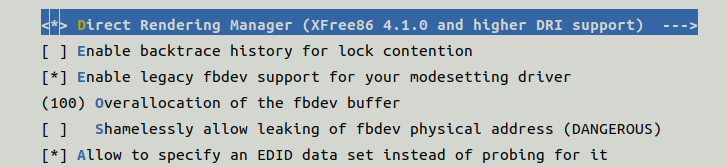
- make kernel-config
make[1]: 进入目录“vim1/fenix/build/linux-mainline-5.18”
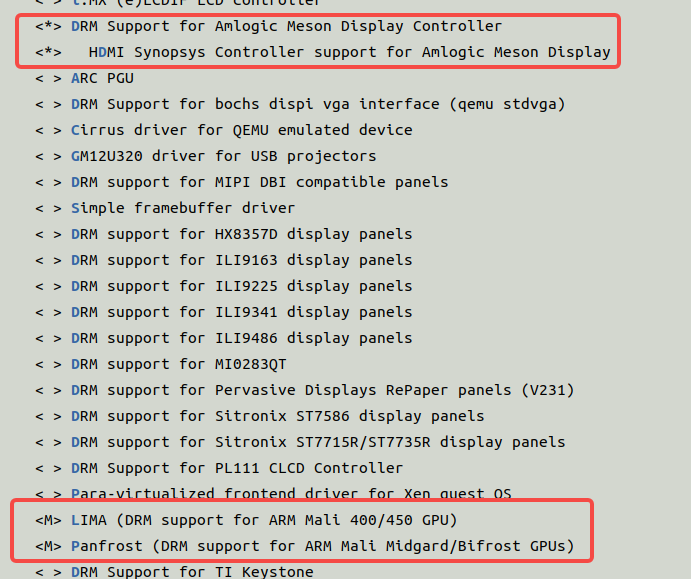
CONFIG_DRM_MESON=y
CONFIG_DRM_MESON_DW_HDMI=y
- DTS ```c meson-gxl-s905x-khadas-vim.dts –> meson-gxl-s905x-p212.dtsi –> meson-gxl-s905x.dtsi –> meson-gxl.dtsi –>//compatible = “amlogic,meson-gxl-vpu”, “amlogic,meson-gx-vpu”; meson-gx.dtsi meson-gxl-mali.dtsi//mali = “/soc/apb@d0000000/gpu@c0000”;
./meson-gx-mali450.dtsi:44
/* &apb { mali: gpu@c0000 { compatible = “arm,mali-450”; reg = <0x0 0xc0000 0x0 0x40000>; */ ```
- Driver
fenix/build/linux-mainline-5.18/drivers/gpu/drm/meson
libretch-linux for meson
https://github.com/libre-computer-project/libretech-linux/tree/master/drivers/gpu/drm/meson
感谢阅读!